Embedding a badge in your project's README.md is as simple as adding a
standard Markdown image link. Because the badges are pre-generated and hosted
via GitHub, you just need to construct the correct URL.
Base URL
All badges are served from the following base URL:
https://raw.githubusercontent.com/airone01/ft_badges/refs/heads/main/badges/
Naming Convention
The filename of each badge follows a strict format based on its properties:
{project_name}--{shape}--{score}--{logo_style}--{theme}--{variant}.svg
Parameters Explained
| Parameter | Description | Valid Options |
|---|---|---|
| project_name | The name of the project. Spaces are replaced by underscores, and all letters are lowercase. | libft, ft_printf, born2beroot, minishell, etc. |
| shape | The shape of the badge. | square, pentagon, round |
| score | Your numerical score for the project. | 0, 50, 100, 125, etc. |
| logo_style | The style of the 42 branding on the badge. | logo, text |
| theme | The background color scheme. | dark, light |
| variant | The visual texture of the badge. | classic, noisy |
Markdown Examples
Here are a few examples of how to put the URL together and embed it in your
README.md.
Example 1: Perfect Score Libft (Dark, Noisy)
This generates a square badge for libft with a score of 125, using the logo
style, dark theme, and noisy variant.
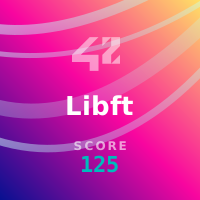
Result:

Example 2: Passing ft_printf (Light, Classic)
This generates a round badge for ft_printf with a score of 100, using the text
style, light theme, and classic variant.
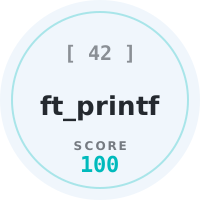
Result:

Example 3: HTML with width constraint
If you find the SVGs are displaying too large in your README, you can use HTML
<img> tags instead of standard Markdown syntax to control the width.
<img
  src="[https://raw.githubusercontent.com/airone01/ft_badges/refs/heads/main/badges/minishell--pentagon--100--logo--dark--classic.svg](https://raw.githubusercontent.com/airone01/ft_badges/refs/heads/main/badges/minishell--pentagon--100--logo--dark--classic.svg)"
  alt="minishell score"
  width="200"
/>
Local Development & CLI
If you want to generate a custom badge with a unique name or a specific HEX
color, you can use the ft_badges Python CLI.
Installation
git clone [https://github.com/airone01/ft_badges.git](https://github.com/airone01/ft_badges.git)
cd ft_badges
# optionally  set up a venv here as needed
pip install -r requirements.txt
Commands
Generate a single custom badge:
./main.py gen badge --project "My Custom Project" --shape square --score 125 --logo logo --theme dark --variant noisy --color "#FF5733"
Regenerate the entire batch & catalog:
# update all SVGs
./main.py gen badge --batch
# update the Markdown docs files
./main.py gen docs --batch
Information:
You can also pass --config=my_config.json to process a completely custom batch matrix